


SERVOsoft® FAQ
1. Who should use SERVOsoft?
- SERVOsoft is for drive systems suppliers,
machine manufacturers and systems integrators for machines, robots, product
handling equipment and other servo based machinery.
- Who are dissatisfied with basic single axis sizing tools and
custom spreadsheets, which are incapable of sizing complete systems.
- SERVOsoft is an engineering software tool that sizes complete
servo systems including all electrical and mechanical components,
with up to 50 axes and 15 mechanisms.
- Unlike many other sizing tools in the industry, which are typically
focused on a single axis motor and/or drive, or gearbox or coupling,
using simplified models and calculations, and therefore are incomplete.
- SERVOsoft is the only vendor neutral complete tool for sizing servo systems, using detailed models and calculations with no assumptions, creating better performing, reliable, efficient and cost effective designs with up to 80% time savings - every time.
2. Getting Help
The help file is very thorough and will help you understand how to use SERVOsoft . The help file is also a great learning resource. When running SERVOsoft, press F1 at any time, and the help file will open to the appropriate topic. The help file is also available online at our Help page.
Our online Tutorials walk you through various tasks step by step.
You may submit questions using our support and feedback form.
3. Installing from a Download
Starting with v4.2, a unified install package is used where one EXE works for all versions (Trial, Lite, Advanced, Pro, Manufacturer) and license types (ACT/DGL/TS). Multiple license are supported on the same machine.
To install SERVOsoft, simply run the installation file. Once installed, launch the License Activation Wizard, and follow the steps to create and send a license request email to ControlEng.
Then ControlEng will quickly review the request and send you a license file. For the DGL version, first plug in the dongle into your machine. Then double click the license file, and when prompted, click yes to program your license.
Note: Once you have purchased a license, a USB dongle key will be shipped to you within a few days.
4 . What are the system requirements for SERVOsoft v4?
| Component | Required | Recommended |
|---|---|---|
| Operating System | Windows 10 64-bit | Windows 10 / 11 64-bit |
| Processor | Intel® i5 2 GHz | Intel® i7 |
| RAM | 8 GB | 16 GB |
| Free hard drive space | 300 MB | 400 MB |
| Video Adapter / Monitor | 1368x768
resolution 16bits – 16.8 M colors 500 MB memory |
1920x1080
resolution 16bits – 16.8 M colors 1 GB memory |
| USB port | v2 | v2 or higher |
5 . Why is servo system sizing important?
An undersized design will fail to meet performance requirements, and in extreme cases, can overheat and damage components. In many cases it is safe to use an oversized motor, and this is what occurs quite often since the many calculations can be complex and time consuming. However, an oversized motor is not a cost-effective solution. Larger motors require larger drives, and most often lead to larger infeed modules, filters, bleeders, cables, etc., which in turn require a larger cabinet enclosure to house the components. Over sizing has a ripple effect throughout the entire design. Usually larger components, be they motors, drives, gearboxes, etc., are higher priced than smaller units. Finally, an over sized design increases the long term operating costs as the design is inherently less energy efficient.
In summary, most engineers will over size because it is the easier and safer approach. However, over sizing increases the initial system cost as well as the ongoing operating cost of a servo system.
6. How accurate is SERVOsoft?
7. Can SERVOsoft model any vendors' products?
Yes. SERVOsoft is a generic model for motors, drives, infeed, bleeder and capacitor modules, gearboxes, couplings, rack and pinions, ball screws, etc. This is because all calculations are based on industry standard rating methods and physics.
In the area of gearbox life and input and output bearing life calculations, gearbox vendors tend to differ in how they rate their products. Therefore, SERVOsoft is structured to support different calculation methods for different vendors. If your calculation method is currently not offered in SERVOsoft, please contact us to see how we can add support for it.
8. Which inverter current rating does SERVOsoft use?
Inverter current ratings can be confusing because not all manufacturers rate their inverters the same. Inverters have two current ratings, a peak rating and a continuous rating. The peak rating is the maximum current that can be generated for a brief period of time, usually no more than 5 seconds, typically 0.5 – 3.0 seconds. The continuous current rating is the maximum current the inverter can produce indefinitely. Some vendors rate their inverter current as RMS continuous, some as RMS peak, and some as peak. The difference can be significant.
RMS indicates the power available from current. For sinusoidal brushless motors, the RMS rating is 70%, (1/v2) of the maximum current rating. So, an inverter that is rated at 10A RMS continuous could be rated at 28.28A Max peak-to-peak (10A x v2 x 2 = 28.28A), even though both drives produce the same amount of current. SERVOsoft uses the rms effective current rating of 10A RMS, which is most common among servo system vendors. The following graph best illustrates the differences:
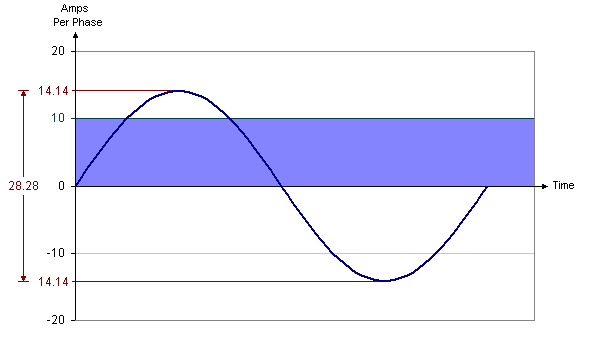
Note that difference can be as large as 2.82 times (v2 x 2 = 2.82).
9. Why are there so many charts in SERVOsoft?
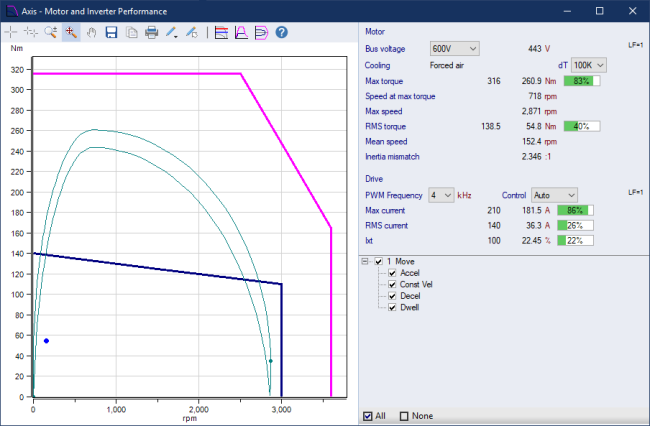
A raw numeric calculation is just a number. It provides little or no context as to how the number fits into the problem. Charts on the other hand, provide context and perspective to the calculation. A picture does paint a thousand words.
Consider two numbers, a motor peak torque calculation, and its resulting peak torque margin. Together they provide good and needed information, but there is something missing. What is the shape of the peak torque curve? And what if we adjust the motion profile somewhat, can we get better performance? See the technical article on Servo System Optimization: Better Performance for No Cost, which explores this exact problem, and yields impressive results in the right circumstances.
10. How do I get SERVOsoft to work in Chinese & Japanese?
SERVOsoft v4 requires the following to work in Chinese & Japanese:
- The Chinese/Japensese language option must be enabled in your SERVOsoft license.
- For PDF reports in Chinese/Japanese, one of the following fonts must also be installed:
- Chinese:
- SimSun1
- SimHei1
- MingLiU1
- FangSong1
- Arial Unicode MS2
- Japanese:
- MS Gothic1
- MS PGothic1
- MS UI Gothic1
- Yu Gothic1
- Yu Gothic UI1
- Chinese:
Notes:
- By default, these fonts are usually installed on Windows 10/11 machines.
- Arial Unicode MS:
- The "Arial Unicode MS" font is located at C:\WINDOWS\Fonts\ARIALUNI.TTF
- The "Arial Unicode MS" font is usually installed with MS Office by default, but not always depending on the program version.
- The "Arial Unicode MS" font can also be purchased online.
- Please note that ControlEng has no affiliation or connection with any company wrt to the "Arial Unicode MS" font.
11. The Print to Word report is no longer available in SERVOsoft. What can I do?
In v2, users could print the report to a Word document. This feature is no longer available in v3 and newer. Only PDF and image files are supported. What can you do?
There are a few options including some online tools that convert a PDF to a Word document, but they generally do not do a great job. Word 2013 and newer supports opening and editing PDF files and works well. And there is one desktop application we found that for a modest fee, properly converts the SERVOsoft PDF report to a Word DOCX file. It is Solid Converter by Solid Documents (www.soliddocuments.com). Please note that ControlEng Corporation has no affiliation with Solid Documents, and gets no compensation for making this recommendation. We are just trying to help those few users that really need the SERVOsoft report in a Word file.
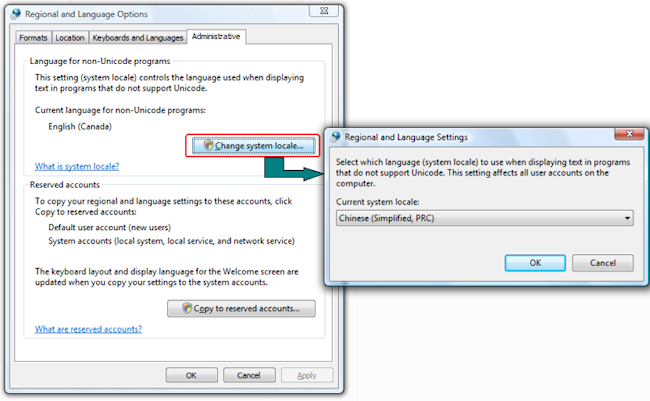
12. How do I check or change my Windows Locale settings?
Click 'Start > Control Panel > Regional and Language Options'.
13. Can SERVOsoft run on 64-bit machines?
Yes, SERVOsoft runs on 64-bit machines. Since v2.9 was released in 2010, SERVOsoft supported 64 bit machines. In fact, SERVOsoft v4 takes full advantage of Windows 64-bit with better performance and larger memory space. Please see the FAQ#4: System Requirements for details.
14. Why does the Program or Database Update Check Fail?
The program or database update check fails with a time out or "Able to connect, but not able to download".
During startup, if the following messaage appears:
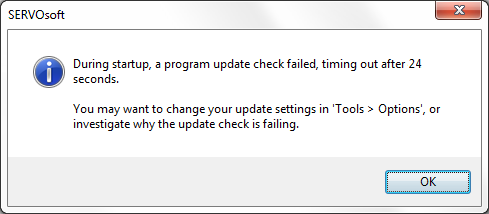
It means that SERVOsoft is not able to check for a program or database update. The underlying cause is that SERVOsoft is not able to download files from the Internet. So an update check is not possible and times out. This is usually caused by one of 2 possibilities.
- A common cause of this problem is that the PC firewall is blocking SERVOsoft download access to the Internet. The solution is to give the SERVOsoft.exe firewall access to the Internet.
- However, the most common cause of this problem for larger companies with a proxy server is two fold. First, the wrong proxy server settings. And second, the proxy server may allow the user to access the Internet, but it still may be blocking the SERVOsoft.exe download access to the Internet.
- First, ensure the proxy server settings in the Options form ('Tools > Options) are correct:
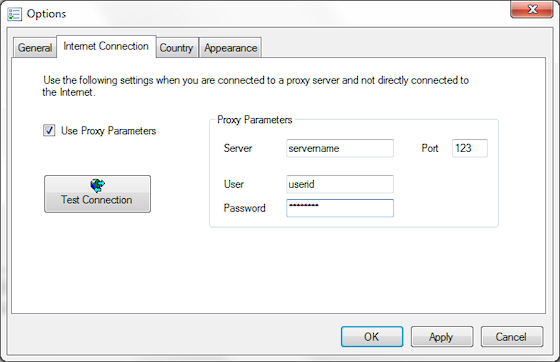
- Then speak with the IT Administrator who manages the proxy server, and ask to grant SERVOsoft.exe download rights to the Internet.
- Another solution is to disable update checking. You might do this because:
- You want to control when updates are made
- The Internet connection is slow
- The IT Administrator will not grant the SERVOsoft.exe download rights
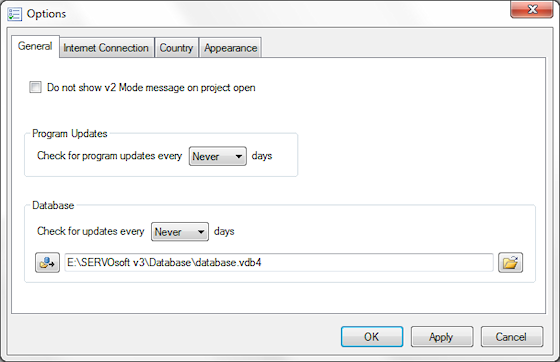
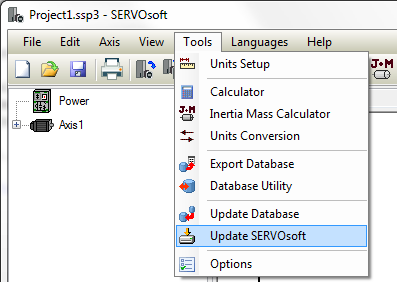
And if you choose to disable the update checking, and SERVOsoft has download rights, then you can make a manual update check from SERVOsoft as shown.
- First, ensure the proxy server settings in the Options form ('Tools > Options) are correct:
15. How do I perform an unattended network install of SERVOsoft?
Often an IT Admin will want to automate the installation of applications on workstations. This is usually done by an 'unattended network install', and can be done using the following steps.
- Download the SERVOsoft "setup.exe" install package
- Run the Windows Command Prompt as an 'Administrator'
- There are two options:
- Use the following command line to run a silent install from the command line.
setup.exe /exelang 1033 /exenoui /qn /norestart
Notes:- /exelang [langId] specifies the language where 1033=EN, 1031=DE, 1036=FR, 1040=IT, etc.
- /qn : silent install
- For details on command line variables, see this Advanced Installer Help page.
- Another option is to extract the MSI and other files from the "setup.exe" install package.
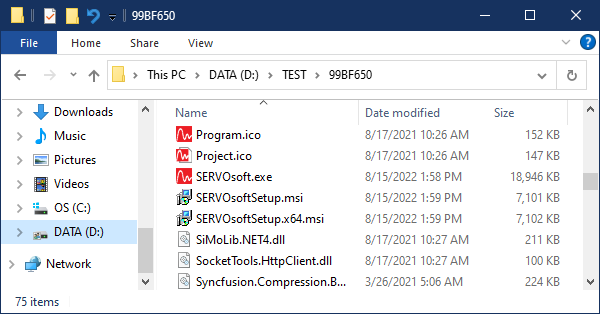
Then use the "setup.exe /extract [target]" command line to extract the following files.
setup.exe /extract "D:\TEST"
- Use the following command line to run a silent install from the command line.
- Then run the 64-bit MSI file using this command line:
msiexec /i SERVOsoftSetup.x64.msi /passive
1. How do I upgrade my license?
- SERVOsoft must be installed on your machine.
- Launch the License Activation Wizard either from the start menu or from the program:
-> Start Menu:'Start > Programs > SERVOsoft > License Activation Wizard'
or
-> Program: Run SERVOsoft, then goto 'Help > Upgrade License'
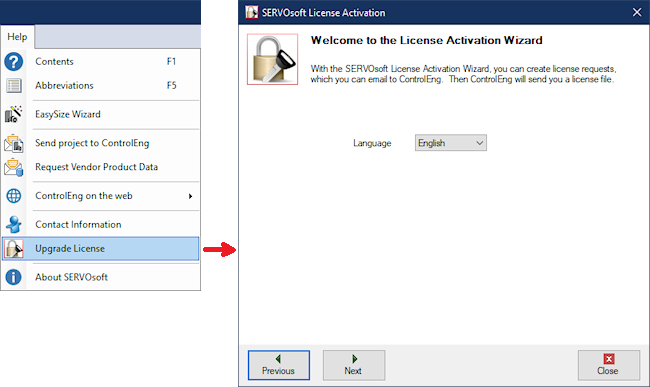
- Follow the steps in the License Activation Wizard.
- The last step of the wizard requires you to send your license request file to ControlEng.
- We will promptly create your license upgrade file and email it to you.
- Copy the new license file to your hard drive.
- If using the DGL version, make sure your USB dongle is plugged into your machine.
- Double-click the new license file.
- Your license has been upgraded.
2. How do I configure a License Server with one or more shared SERVOsoft licenses?
- Whether using a Network Dongle or a Stand Alone Dongle, SERVOsoft must be installed on each user's machine. In the diagram below, this means on every Local User and Remote User's machine that wants to use SERVOsoft.
- The License Server software only needs to be installed on one central machine that can be seen by all SERVOsoft users on the network.
- The License Server software runs on Windows 10 / 11 | Desktop / Server
- The server has minimal hardware requirements since SERVOsoft does not run on the License Server.
- Steps to Install:
- Download the CodeMeter License Server Software
- To setup a License Server, goto Network License Server
- To setup a License User, goto Network License User
Note: A Network Dongle programmed with several shared licenses can also be used as a Stand Alone license by simply connecting it to a PC with SERVOsoft installed. The only drawback is that the multiple licenses are not available to other users. This capability is useful for testing purposes to validate the dongle is programmed with the correct license and functioning correctly.

3. How do I get my network license to work over a VPN?
To access your company's SERVOsoft Network License Server (NWLS) over a VPN, just point CodeMeter to your NWLS. This is all that is needed. You do not need a local license on your machine.
The first and most important thing is that your machine can "see" or "ping" the NWLS. This usually requires your IT department to provide you VPN access when working remotely, and also allows you to "see" or "ping" the NWLS. If you cannot "ping" the NWLS, then nothing will work. Once you can "ping" the NWLS, then the next step is to point CodeMeter to your NWLS.
To do so is quite straight forward. First, open CodeMeter Control Center then click the WebAdmin button…
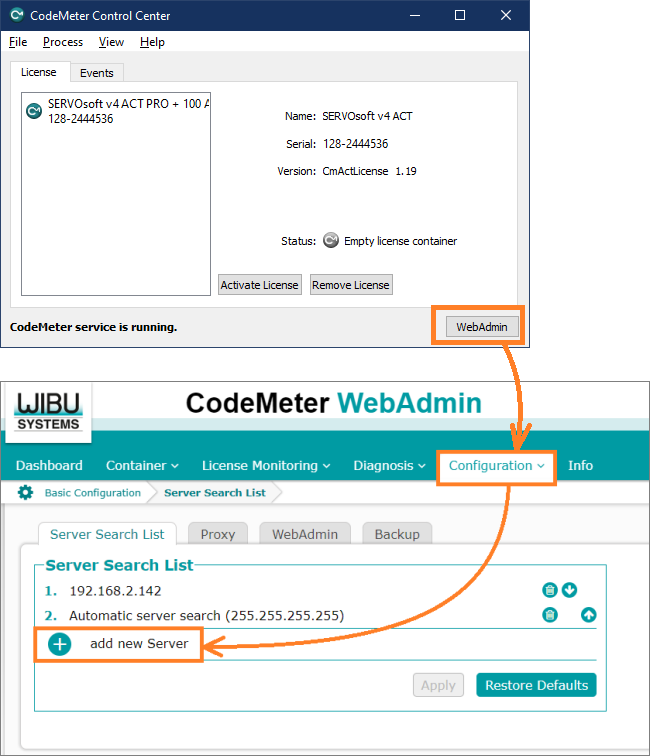
WebAdmin opens in a browser. Then click Configuration then add new Server and enter the NWLS machine name or IP address provided by your IT department. Then run SERVOsoft and if a network license is available, your machine will borrow a license. Multiple SERVOsoft instances are allowed on the same machine. When the last SERVOsoft instance is closed, the network license is released for others to use.
4. How can I see who is using the network licenses?
If you are a SERVOsoft NW DGL user, then run SERVOsoft, and then click on 'Help > About'. Then click the List Users button. You can also find it at 'Start > Programs > SERVOsoft > List Users'.

If you are a Network Administrator, you can use the CodeMeter WebAdmin tool on the network license server, which provides more details, and also allows you to 'Cancel' a user to free up a license.
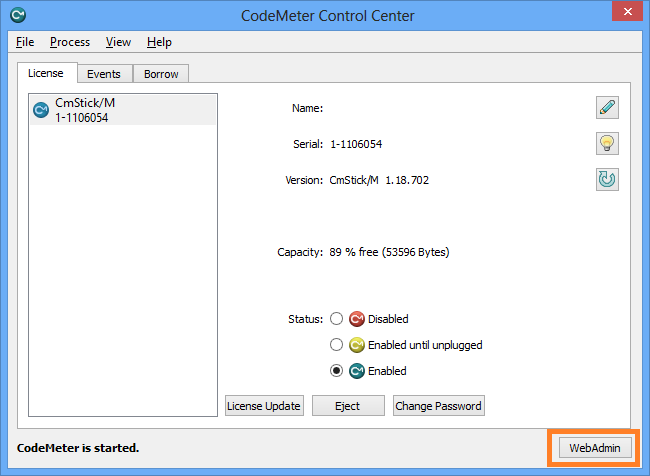
First, on the network license server, launch the CodeMeter Control Center. You will see your CmStick Dongle in the License list, confirming that the dongle is connected and seen by CodeMeter. Then click on the WebAdmin button.
Next in the Web Admin tool, click 'Server'...
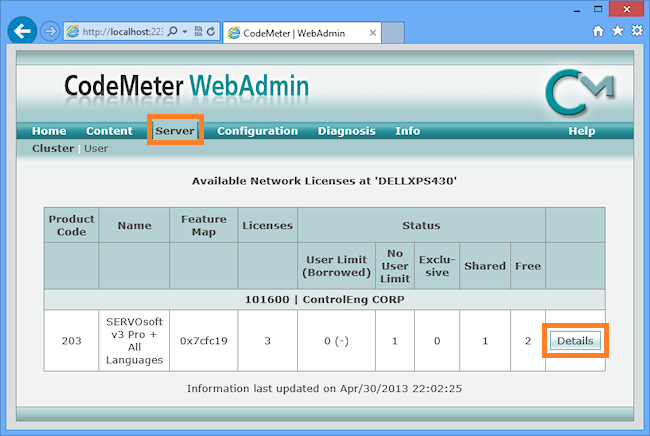
Then click the 'Details' button where all active users are listed. In this case shown below, there are two active users- John Smith and Hans Mueller. You can see their names, IP addresses, etc. And if for some reason you want to bump a user to free up a license, click the 'Cancel' button for the 'Station Share' license you want to release.
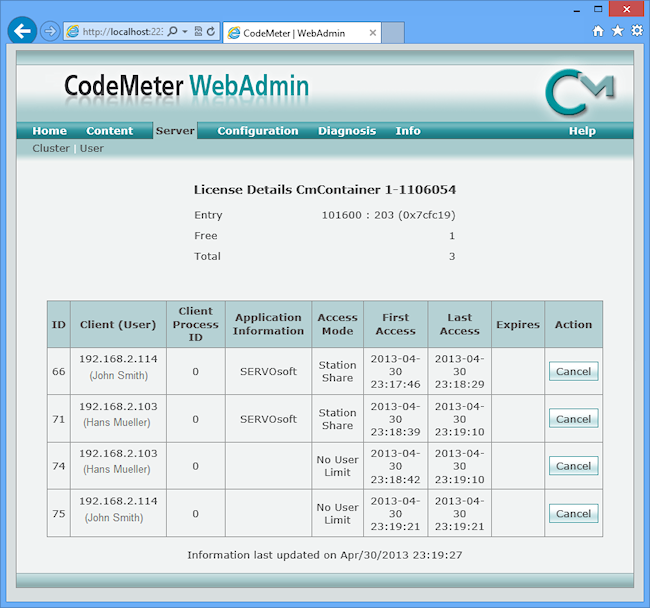
Note that for each of the two used network licenses above, there is also a 'No User Limit' container, which is used by CodeMeter to allow SERVOsoft to run unlimited instances on each user's PC that is using a network license. The 'Station Share' container is the network user license.
5. How do I remove expired or unwanted SERVOsoft ACT licenses?
Some users have old beta or other test licenses that have expired or are otherwise no longer valid. So they sit in CodeMeter, and may cause some confusion. So in such cases, you can remove them. Here is how...
Option 1: Directly in CodeMeter Control Center
- Open CodeMeter Control Center, and select the license you want to remove. For example, license SERVOsoft v3 ACT Trial [Serial: 128-1858298], which is highlighted below.
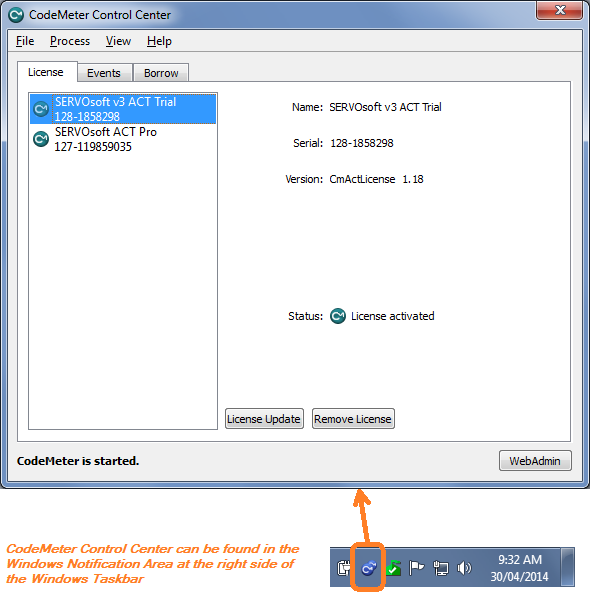
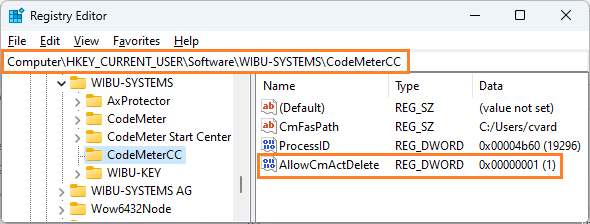
- If the Remove License button is not enabled, then you can enable it by setting the following Registry setting AllowCmActDelete = 1 as shown...
- Next click the Remove License button, and a message box appears asking you to confirm you want to erase the license.
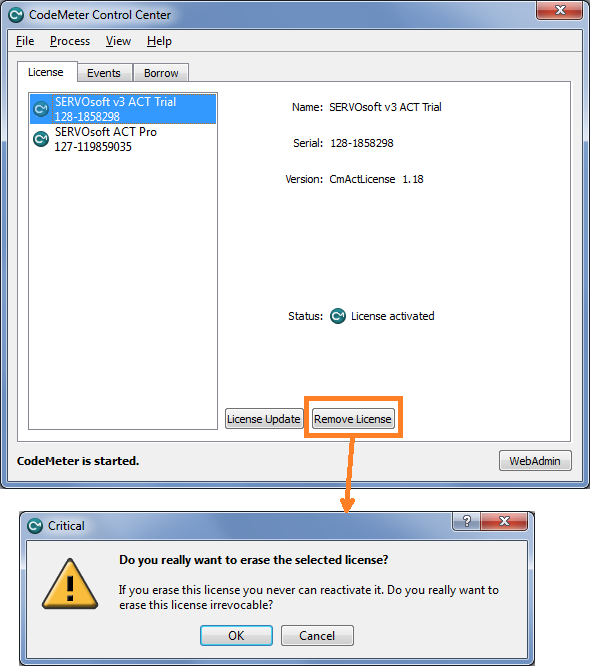
- Then click OK and the license will be deleted.
Option 2: Manually Remove License Files
Option 1 method above should work most of the time. However, if the 'Remove License' button is disabled, then follow Option 2 to remove any unwanted licenses.
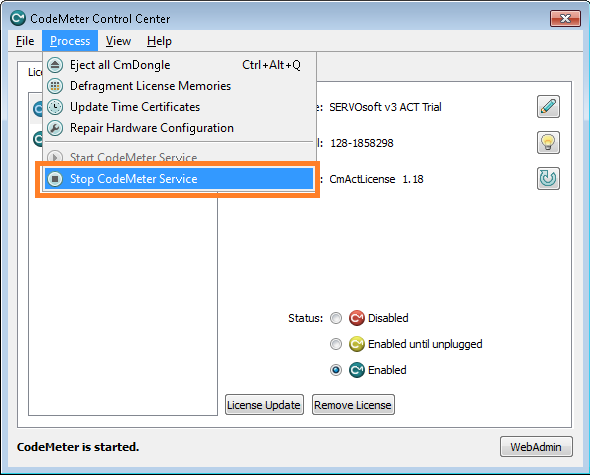
- Stop the CodeMeter runtime:
- Find the folder where the licenses are stored
- 64-bit system: C:\ProgramData\CodeMeter\CmAct
- 32-bit system: C:\Program Files\CodeMeter\CmAct
- Find the file that is representative of the CodeMeterAct License, which in our example is SERVOsoft v3 ACT Trial [Serial: 128-1858298]. Therefore, the file we need to look for is 5000116_128-1858298.wbb.
- Delete the file 5000116_128-1858298.wbb.
- Start the CodeMeter service.
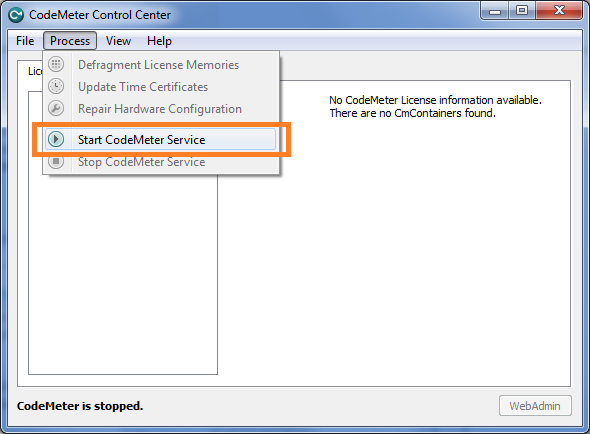
- When the CodeMeter Service is started, the CodeMeterAct License will be gone.
6. Can I have multiple SERVOsoft licenses on the same PC?
Yes. SERVOsoft allows you to have multiple licenses at the same time. This is very useful to sales people and distributors who support multiple manufacturers, and therefore need to use more than one SERVOsoft Manufacturer version.
When more than one license exists when the program starts, you are prompted to select which license you want to use. Next time the program starts, the previous license is selected by default.
And if you know you want to run the same license all the time such that you do not want to be prompted each time the program starts, then click the "Next time, don't ask me, just use this license" checkbox. And then if you want to force the select license window, hold down the CTRL key when the program starts.
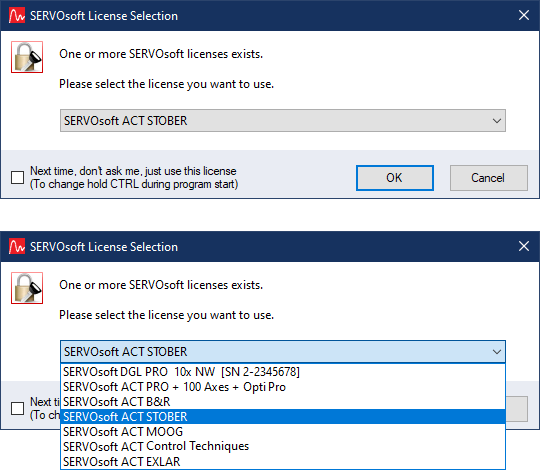
So how do you add a licenses to the above list? Same as always, make a new license request.
Launch the License Activation Wizard either from the start menu or from the program:
-> Start Menu: Start > Programs > SERVOsoft > License Activation Wizard
or
-> Program: Run SERVOsoft, then goto Help > Upgrade License

Then click 'Next' and complete the steps until you get to the step where you can select the program version. Then select one of the Manufacturer versions...
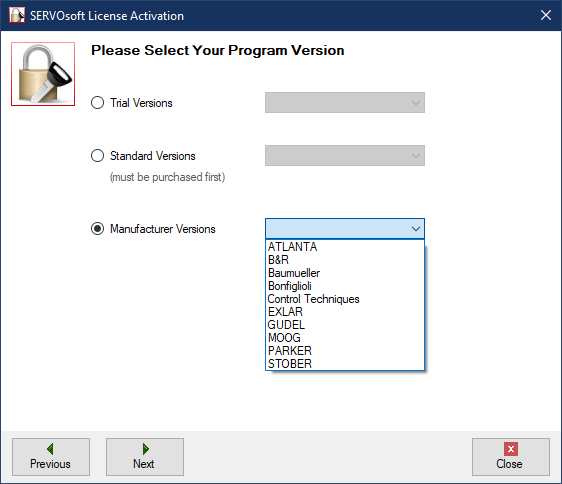
Then click 'Next' and follow the rest of the wizard steps as usual and send your license activation request email.
7. During License Validation, why do I get 'Internet Connection Not Available' or 'Time Out' errors?
Almost always, this is either a proxy server and/or a firewall issue.
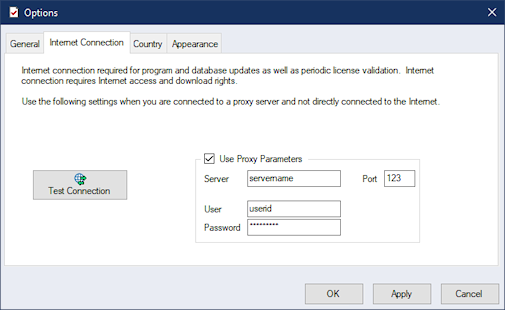
- First, if your PC connects through a proxy server, you need to enter the same proxy settings used by your browser. In SERVOsoft, goto 'Tools > Options' to open the Options form and click on the 'Internet Connection' tab, per the screenshot to the right. Select the 'Use Proxy Parameters' checkbox and then enter your proxy parameters.
- Next check your Windows and/or other local software firewall and allow SERVOsoft download access to the Internet.
- Once 1 and 2 above are done, try connecting. If it is still blocked, then most likely it is an external firewall that is blocking SERVOsoft. In this case you need to speak with the IT department to allow SERVOsoft download access to the Internet.
1. How can I add my products to the SERVOsoft database?
There are two of methods to add or edit product data in the SERVOsoft database - Add/Edit Database Forms and the Database Utility using the database spreadsheet.
Note: Product data can only be added/edited with the SERVOsoft LITE /ADVANCED / PRO versions
1. Add/Edit Database Forms
You can manually enter product data directly into the database with the built in Add/Edit database forms. Simply open a database listing, then click either the "New" or "Edit" buttons at the top right of the form. See image below for editing an existing coupling's data. For other licenses such as the manufacturers versions, users can view the product data, but the ability to make and save any changes is disabled.
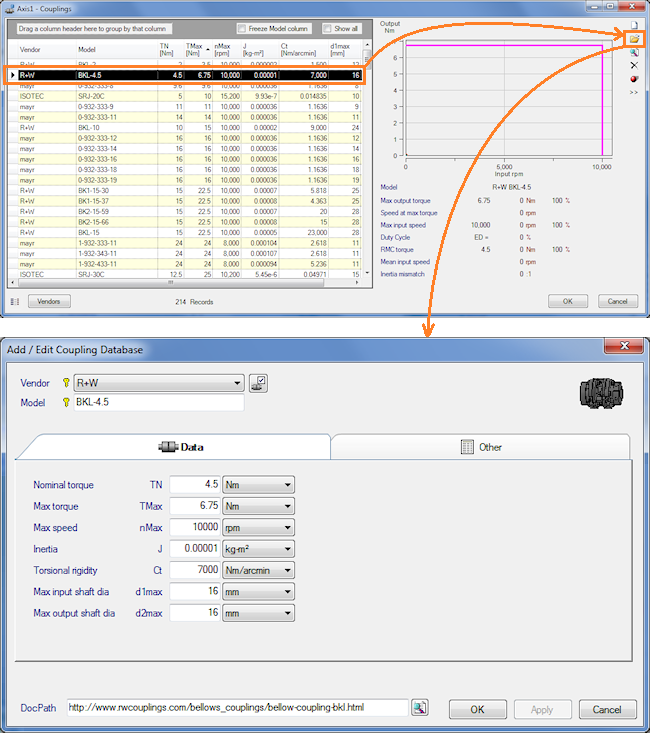
If the vendor you want is not in the drop down list, click the 'Vendors' button to the right of the Vendor drop down list. Note that the 'Vendor' and 'Model' fields combined, uniquely define the record in the database. These are known as Primary Keys. Then change all the parameters as needed. Finally click the 'Apply' button to save the record to the database.
2. Database Utility
The Database Utility was built to manage the importing of product data from a "source" spreadsheet or database file to a "target" database file. The target database can be used to test the data locally before sending the spreadsheet to ControlEng for publication; and/or simply use the database privately, shared within an organization, as well as colleagues, partners, customers, etc.
If you are a vendor or distributor, and/or you have 100s or 1000s of products you want to add, we can include all your products in the SERVOsoft database for distribution to all SERVOsoft users around the world. Please contact us for all the details.
After reading the steps below, please see the tutorial Database Utility: Import Product Data, which walks through the steps outlined below to import product data into a SERVOsoft database file.
Step 1 is the source data. Start with the database spreadsheet, which is in the default database folder at C:\ProgramData\ControlEng\SERVOsoft v4\Database\SERVOsoftDatabasevM.m.xlsx, or can download the latest at the Product Data Entry page. The spreadsheet contains worksheets for rotary motors, linear motors, gearboxes, couplings, drives, infeed, bleeder, capacitor modules, racks, pinions, ball screws, linear actuators, pumps, etc.
Step 2 is to launch the Database Utility at:
- Windows Start Menu: Start > Programs > SERVOsoft > Database Utility
- SERVOsoft File Menu: Tools > Database Utility
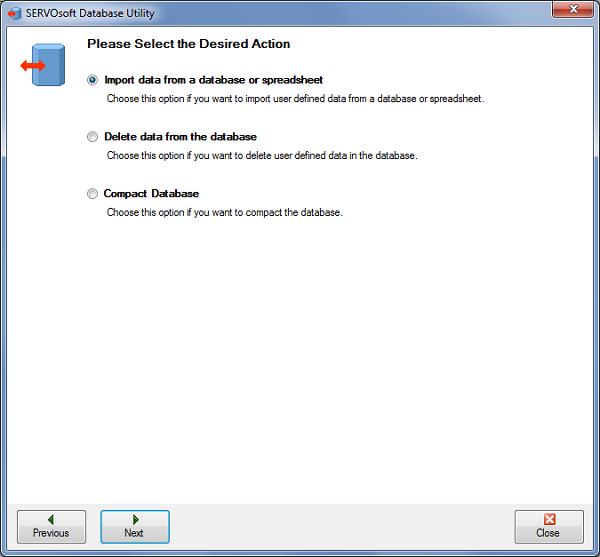
Start the Database Utility and select 'Import data from a database or spreadsheet', then click 'Next'.
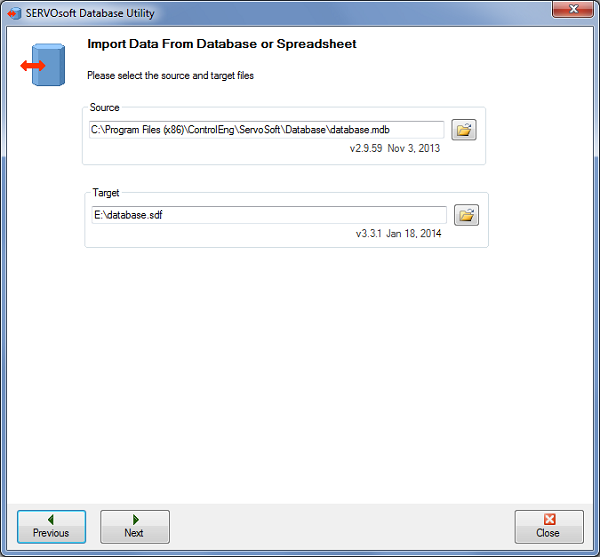
Then select the Source and Target files. The source file can be a v2, v3 or v4 database spreadsheet (see here), or a v2 database (.mdb), 3.2 database (.vdb4) or a v3.3 / v4.x database (.sdf). The target must always be the latest v4.x database file. Ie. Always importing from older to newer.
Note: It is recommended to make a copy of the target database file, and work with that. This way, in case you make a mistake, you always have the original database file.
Then click 'Next'. The utility will examine both the source and target datasets, and look for differences in data. It will also check for duplicates in the source. In most cases, products are uniquely defined by the Vendor, Model combination. If there is a duplicate Vendor, Model, the utility will inform the user and stop the process. In this case, the user must correct the source data to proceed beyond this point.
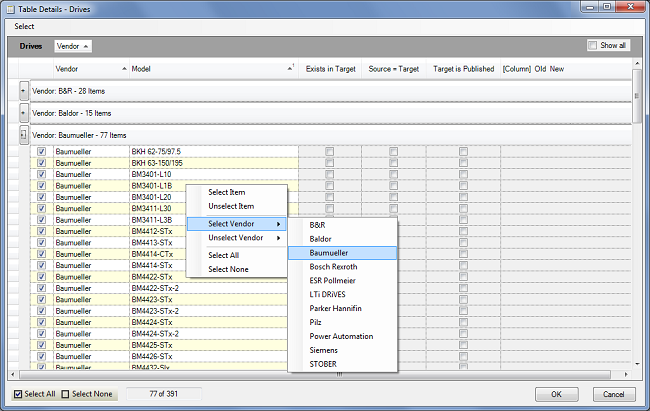
The next step allows the user to choose from the source file, specific tables, and products within those tables to include or exclude in the import process. By clicking the ".." button beside each table, the user can open the specific table of products and choose which products to include or exclude.
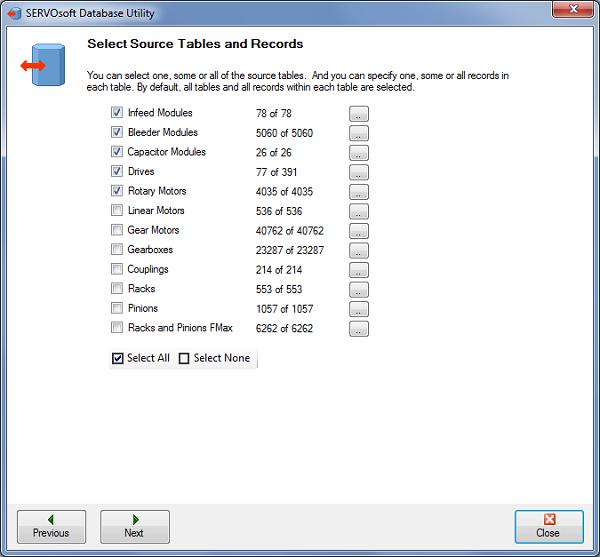
Image below shows how the user can right-click and select all 'Baumueller' drives...
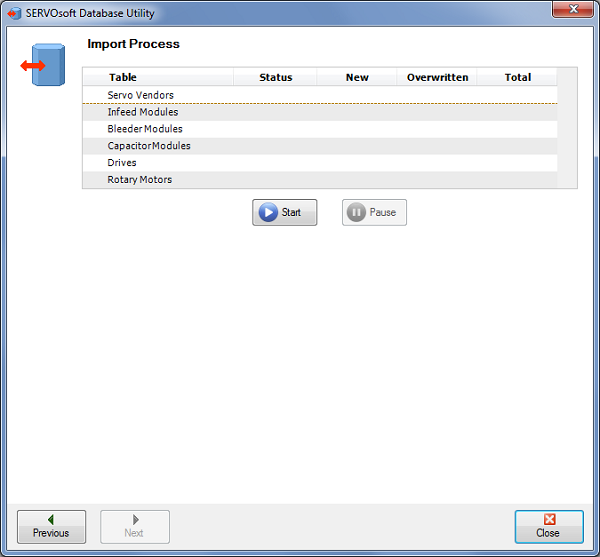
After selecting the specific tables and products, click 'Next' to go to the import step. Then click the 'Start' button to begin the import process.
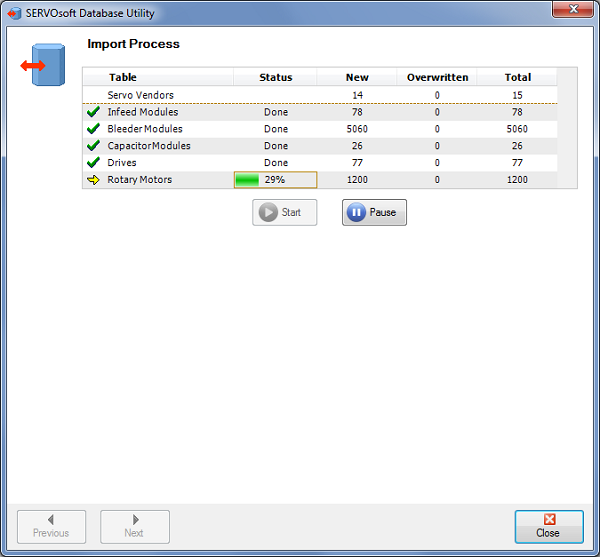
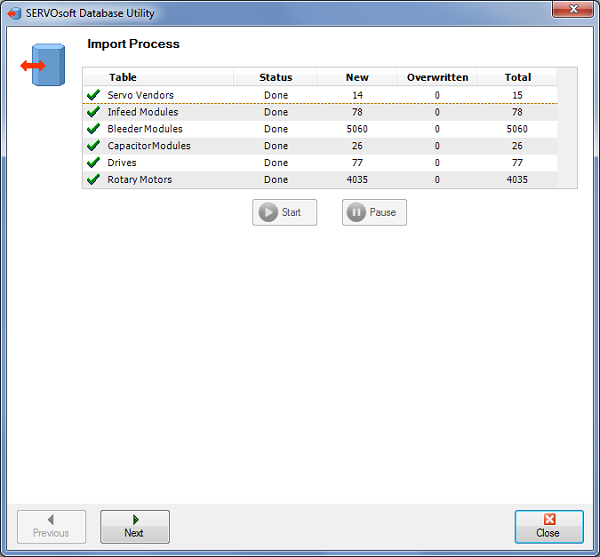
Then the utility works away, providing status updates…
When it is done, click 'Next'…
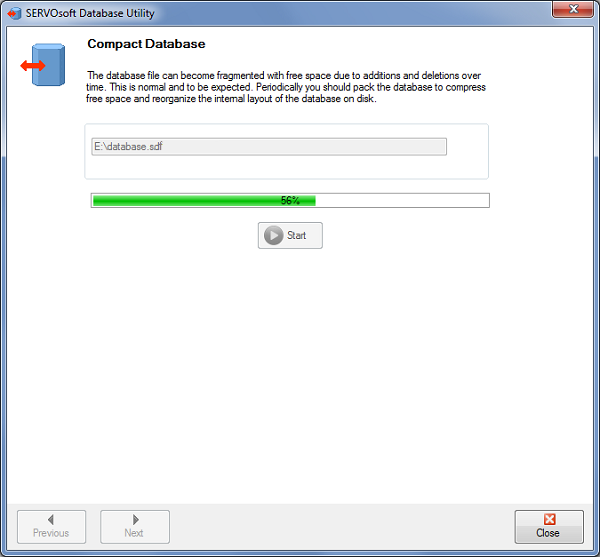
Then the last step is to Compact the database, which can help improve database performance… so click 'Start'…
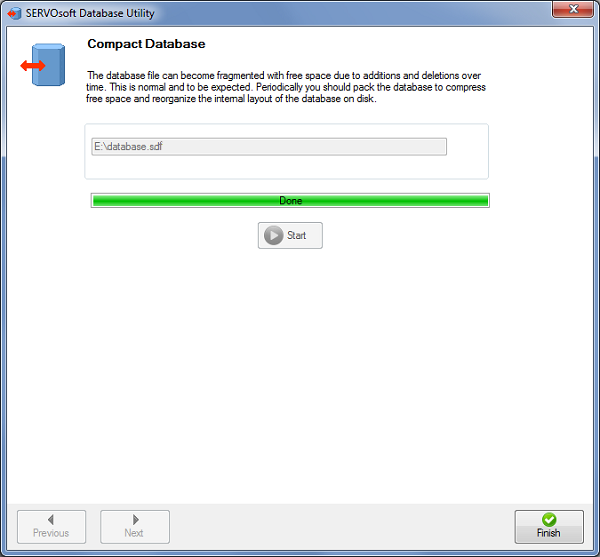
Done. Click 'Finish' to close the wizard.
2. How do I get the latest database updates?
There are three options:
- Database Updates Only: Run SERVOsoft, then click Tools > Update Database (see Database Updates)
- Program and Database Updates: Run SERVOsoft, then click Tools > Update SERVOsoft
- Downloads Page: Download the database file directly from our downloads page
Note: If you are behind a firewall, you may need to ask your IT department to allow SERVOsoft to access the controleng.ca web server to get the updates. You can enter your proxy server settings in SERVOsoft under Tools > Options, under the 'Internet Connection' tab.
3. Which products are in the database?
The database included in the Lite, Advanced and Pro versions is extensive, and continues to grow every month. Get the latest database updates at any time using 'Tools > Update Database'.
The Lite, Advanced and Pro versions allow users to add, edit or delete any product in the database. Licensed users have full control of their database file.
If you would like to see other products added to the database, please see our Product Data Entry page.
As of Feb 16, 2026, the database includes over 40+ vendors and 150,000+ products including:
- Servo Vendors: Applied Motion Products, B&R, Baldor, Baumueller, Beckhoff, Bosch Rexroth, Bonfiglioli, Bucher Automation, Control Techniques, Curtiss-Wright, Danfoss, ESR Pollmeier, HIWIN, KOCH, Kollmorgen, Harmonic Drive, KEBA, Moog, Parker Hannifin, Power Automation, Refu Elektronik, SEW EURODRIVE, Siemens, STOBER,
Tecnotion, WITTENSTEIN cyber motor, WITTUR and Yaskawa
- 18,300+ Servo Motors, Drives, Drive Motors, Infeed, Bleeder & Capacitor Modules, Energy Storage Modules including:
- 10,000+ permanent magnet servo motors (PMSMs)
- 50 IPMSM internal permanent magnet rotary servo motors (IPMSMs)
- 1,090+ asynchronous rotary servo motors (AMs)
- 10+ brushless DC rotary servo motors (BLDCs)
- 410+ linear permanent magnet servo motors (PMSMs)
- 1,300+ drives
- 70+ drive motors
- 130+ drive gear motors
- 210+ infeed and capacitor modules
- 5,200+ bleeder and resistor modules
- 30+ Energy Storage Modules
- 95,000+ Gear Motors including:
- 3800+ B&R gear motors
- 360+ Curtiss-Wright gear motors
- 480+ Harmonic Drive gear motors
- 91,000+ STOBER gear motors
- 30+ WITTENSTEIN cyber motor (for AGVs)
- 18,300+ Servo Motors, Drives, Drive Motors, Infeed, Bleeder & Capacitor Modules, Energy Storage Modules including:
- Gearbox Vendors: Alpha, Apex Dynamics, Atlanta, B&R, Baumueller, Bonfiglioli, Control Techniques, Curtiss-Wright, Harmonic Drive, Neugart, Nidec-Shimpo, Parker Hannifin, SEW EURODRIVE, STOBER and Sumitomo, Wittenstein cyber motor
- 72,000+ Gearboxes including:
- 2,450+ Alpha reducers
- 6,500 Apex Dynamics
- 400+ Atlanta reducers
- 4,100+ B&R reducers
- 360+ Baumueller reducers
- 7,750+ Bonfiglioli reducers
- 310+ Control Techniques
- 1,200+ Harmonic Drive
- 3,400+ Neugart reducers
- 24,400+ Nidec-Shimpo reducers
- 230+ Parker Hannifin reducers
- 6,250+ SEW EURODRIVE
- 15,000+ STOBER reducers
- 18 Sumitomo Fine Cyclo series reducers
- 72,000+ Gearboxes including:
- Coupling Vendors: ISOTEC, JAKOB, Mayr and R+W
- 289 Couplings including:
- 5 ISOTEC SRJ series couplings
- 10 JAKOB KM series couplings
- 152 Mayr Smartflex 932 series couplings
- 122 R+W BK1, BK2 and BKL series couplings
- 289 Couplings including:
- Rack & Pinion Vendors: Atlanta, Apex Dynamics, Gudel, Nidec-Shimpo, STOBER, YYC
- 3,500+ Racks & Pinions including:
- 1,100+ Apex Dynamics
- 1,250+ Atlanta
- 250+ Gudel
- 100+ Nidec-Shimpo
- 50+ STOBER (only for Rack & Gearbox Pinions)
- 800+ YYC
- 3,500+ Racks & Pinions including:
- Gearbox Pinion Vendors: Atlanta, STOBER
- 18,500+ Gearbox Pinions including:
- 9,300+ Atlanta
- 9,200+ STOBER
- 18,500+ Gearbox Pinions including:
- Ball Screws: Moog
- 450+ Ball Screws including:
- 450+ Moog
- 450+ Ball Screws including:
- Linear Actuator Vendors: Curtiss-Wright, Macron Dynamics, Moog, WITTENSTEIN cyber motor
- 1,300+ Linear Actuators, Motor Linear Actuators & Drive Motor Linear Actuators including:
- 1,300+ Curtiss-Wright
- 35+ WITTENSTEIN cyber motor
- 35 Linear Belt Actuators including:
- 35 Macron Dynamics including Belt Drive, Cart, Dual Cart and Pusher types
- 1,300+ Linear Actuators, Motor Linear Actuators & Drive Motor Linear Actuators including:
- Servo Pump Vendors: Baumueller, Moog, Eckerle, Dorninger Hytronics
- 270+ Pumps
- 80+ Motor Pumps
4. Why does the Program or Database Update Check Fail?
The program or database update fails, and I get the error "Internet connection not available" or "Download Error". Or in the Options form, when I test my Internet connection, I get the error "Able to connect, but not able to download".
Almost always, this is either a proxy server and/or a firewall issue.
- First, if your PC connects through a proxy server, you need to enter the same proxy settings used by your browser. In SERVOsoft, goto 'Tools > Options' to open the Options form and click on the 'Internet Connection' tab, per the screenshot to the right. Select the 'Use Proxy Parameters' checkbox and then enter your proxy parameters.
- Next check your Windows and/or other local software firewall and allow SERVOsoft download access to the Internet.
- Once 1 and 2 above are done, try connecting. If it is still blocked, then most likely it is an external firewall that is blocking SERVOsoft. In this case you need to speak with the IT department to allow SERVOsoft download access to the Internet.
The 3 steps above should solve the problem. However, another option is to download the database update directly from our Database Download page.
1. SERVOsoft installs fine, but when starts, nothing happens. No Splash screen. Just Nothing.
The only clue for this error was in the ErrorLog at
C:\ProgramData\ControlEng\SERVOsoft v4\ErrorLogs\ErrorLog-SERVOsoft.exe.txt
The clue to solving this issue was in the error text "not part of the Windows Platform FIPS validated cryptographics algorithms".

Turns out this registry setting requires FIPS validated cryptographic algoritms. This needs to be disabled for SERVOsoft. So make sure Enabled = 0.

Many thanks to Dan at Curtiss-Wright for helping solve this puzzle!