www  ControlEng
Google
   
     Scientific charts for Developers

Gallery

Check out the 2 Minute Demo of XYChart's Built-in Features, as well as the 5 Minute Demo of XY Chart Excel VBA tutorial which walks you through configuring XY Chart, and displaying a named range of cells in MS Excel.

Click on any of the images below to view them in greater detail.

Click to view larger images

1. Basic Chart

2 Profiles, 1 Y Scale, Legend, Toolbar
Zoom and scroll
Dynamic crosshairs and coordinates display
VB sample code

Click to view larger images

2. Motion Profile with 3 Profiles and 3 Y Scales, Data from csv file

Profiles 1, 2 & 3 mapped to YScales 1, 2 & 3 respectively
Zoom and scroll
Dynamic crosshairs and coordinates display with profile values in legend
VB sample code

Click to view larger images

3. Trending

3 Profiles, 1Y Scale, Legend, Toolbar
3600 samples with 60 samples displayed while trending
X scale scrollbar appears when trending is stopped
VB sample code

Click to view larger images

4. 8 Profiles, 4 Y Scales Hidden, Crosshair Profile Values in Legend

By setting the toolbar and legend visible properties to false, the plot area expands to
     show as much of the chart as possible
With the crosshairs and profile values displayed in the legend, the user can easily
     study the chart without the need for the Y scales

Click to view larger images

5. 4 Profiles, 2 Y Scales and 2 Grids

Profiles 1 & 2 mapped to YScale1
Profiles 3 & 4 mapped to YScale2
Two Y scale grids

Click to view larger images

6. Scatter Chart with 4 Sample Sets with Markers

4 scatter sample sets all mapped to YScale1
Various combinations of marker styles and colors
Dynamic crosshairs and coordinates display

Click to view larger images

7. 50 Profiles and Legend with Scroll

Legend with scroll
Zoom and scroll
Dynamic crosshairs and coordinates display

Click to view larger images

8. DateTime Formatting - Zoom in to Milliseconds

DateTime user configurable
DateTimeFormat = hh:mm:ss AMPM
When XScale range is less than 10 seconds, DateTimeFormat = hh:mm:ss.fff AMPM
VB sample code

Click to view larger images

9. Semi Log (Y Scale is log, and X scale is linear)

Y scale log, X scale linear
VB sample code

Click to view larger images

10. Y Linear & Log, X Linear & Log

Y1 and X1 scales log
Y2 and X2 scales linear

Click to view larger images

11. Null Data Points

Null data points
VB sample code

Click to view larger images

12. Y Scale Stacking 3x2

Y scales stacked 3x2
Crosshairs for all profiles
Zoom with scrollbars or click and drag each scale to scroll

Click to view larger images

13. Y Stacking with 2 Y and 2 X Scales

2 Y scales stacked, Profile 1 mapped to Y1 and X1, and Profile 2 mapped to Y2 and X2
Crosshairs for all profiles
No scrollbars, click and drag each scale to scroll
VB sample code

Click to view larger images

14. Y Stacking with Boolean Y Scale 2

2 Y scales stacked
YScale(2) is Boolean
YScale(2).NumericFormat = "On/Off"
Horizontal scrollbar only

Click to view larger images

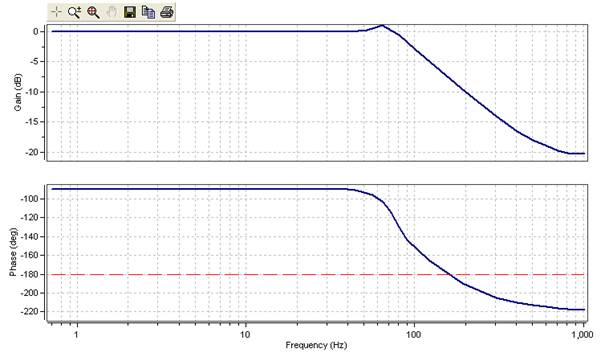
15. Bode Plot

2 Y scales stacked
XScale(1) is Log

Click to view larger images

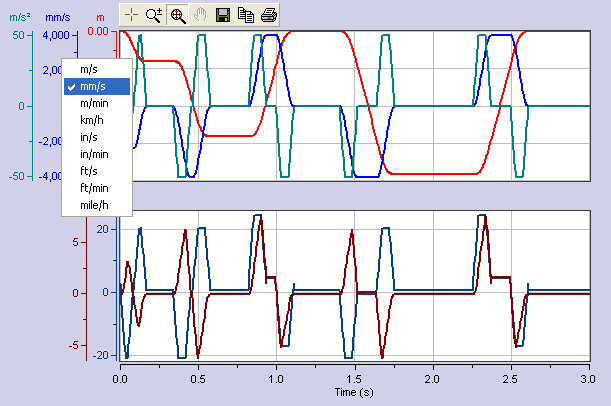
16. Multiple Units Support

Use the ScaleFactor property to easily add multiple units support for each
      XScale and YScale

Click to view larger images

17. Use Your Own Toolbar

Use your own toolbar and still have full functionality of XY Chart

Click to view larger images

18. Stair Mode

Two profiles are using the same data points
Profile 1 is shown wtih XYChart.Profile(1).StairMode = False
Profile 2 is shwon with XYChart.Profile(2).StairMode = True

Click to view larger images

19. Hatching

Shows 2 hatching areas

 
Contact Us   Terms of Use   Privacy Policy    Refunds    Referrals   Site Map
Servo Sizing   Servo Sizing Software   Servo Motor Sizing   Motor Sizing   Motor Sizing Software
   Drive Sizing   Drive Sizing Software
Gear Sizing Software   
Gearbox Sizing Software   XY Chart NET   XY Chart ActiveX   Inertia Mass Calculator
   SEO Services Toronto Canada
Copyright © 2003 - 2010 ControlEng Corporation. All rights reserved.