

News
Company News
SERVOsoft® News
- SEW EURODRIVE publishes product data for new PxG® economy line
Jun 16, 2026 - SERVOsoft v4.7.110 Released!
May 17, 2026 - SERVOsoft v4.7 Released!
Feb 16, 2026 - WITTENSTEIN cyber motor
publishes servo drive
solutions in SERVOsoft
Sep 29, 2025 - SERVOsoft Cloud Released!
May 23, 2025 - Energy Storage Modules
Tutorial
Jan 12, 2025
SERVOsoft News
SERVOsoft® v4.7.110 Released
May 17, 2026
See highlights of the v4.7 release on Feb 16, 2026. For all release details, see the Revision Log.
This SERVOsoft update focuses on improvements derived from direct customer feedback from recent onsite customer trainings and webinars. Several deep discussions flushed out some great ideas. A few of these are so simple and obvious, once you see them, the response is "Of course!".
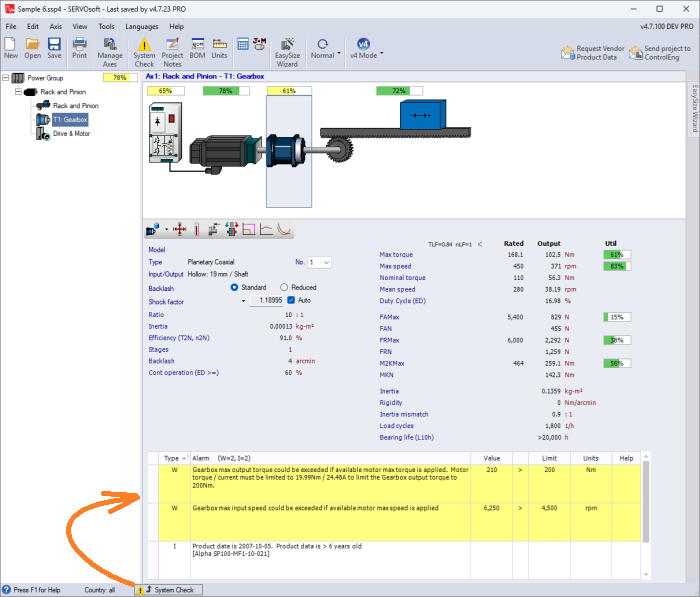
Main form Adds option to display Component Level System Check
Instead of having to bounce back and forth between the Main and System Check forms, why not display both at the same time? Click the Display Component Level System Check button in the status bar at the bottom of the Main form, which displays the System Check messages only for the active component, which in the example image below is the T1 Gearbox. This feature works best when on a larger screen with at least 1920x1080 and the Main form is near or at full screen height.
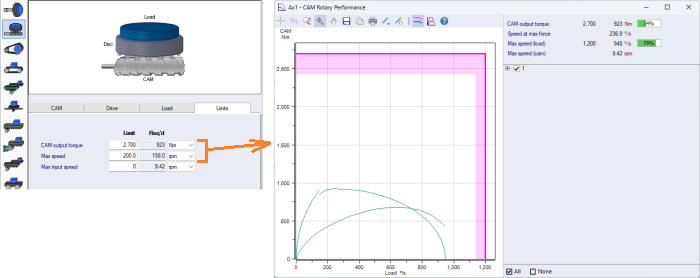
CAM Rotary Table Adds CAM Output Torque vs Load Speed Performance chart
CAM Rotary Table adds CAM Output Torque vs Load Speed Performance chart, including in the Print Report. The chart is enabled when CAM Max Output Torque and Speed Limits are specified in the mechanism form.
Inertia Mass Calculator button is green, shows know when calculated values used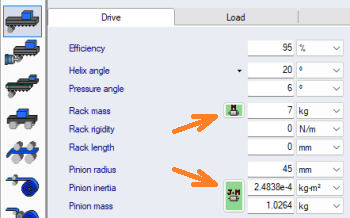
Everywhere Inertia Mass Calculator (IMCalc) values are used to define the mass and/or inertia of an element, the IMCalc button is green. This applies to all Mechanism and Transformation forms.
Dual Conveyor Mechanism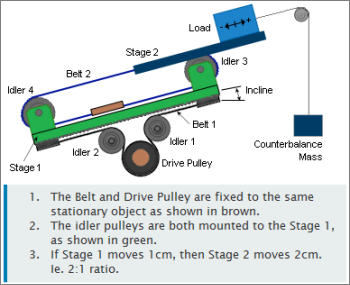
Updated images on Main and Mechanism forms, Print Report and Help page to properly reflect the formulae in the Help page.
Calculation results remain unchanged.
In the Sequence form, when chart Crosshairs are selected, corrected Dual Conveyor mechanism image, which was not moving properly.
Move form Formula Editor improved for handling longer formulae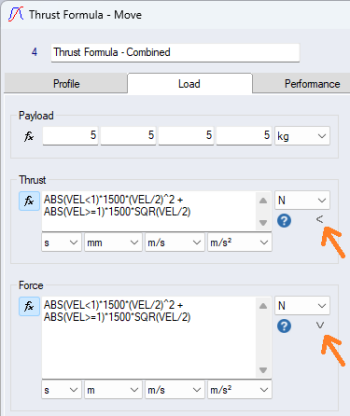
Enhancements made to improve working with longer formulae including:
1) When any of the Load Formulae has a [New Line] character, it is maintained when the project is saved and the Move form is opened later on.
2) Added "Expand formula editor" button providing the option to double the height of the formula editor.
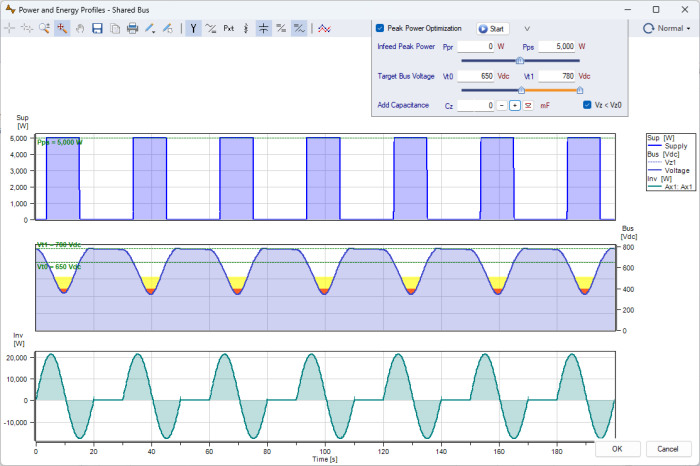
Power vs Time chart: When [Vz] drops below the Supply Voltage, [Vz] profile fills Red
When using the Supply Peak Power Optimization feature, [Vz < Vz0] is checked, and when Vz < Vz0 (Nominal Bus Voltage), a System Check Warning message occurs recommending to contact the vendor for approval of the voltage dip. This is the same as before. What is new is if Vz drops below the supply voltage, [Vs] (eg. 400Vac), a Critical error is reported. Further, to align with this, in the Power vs Time chart, when Vz < Vs, Vz now fills red.
Note: Supply Peak Power Optimization is a PRO version feature.
In the Power vs Time chart below, the 3 plots are Supply Power, Bus Voltage and Inverter Power. For this topic, we are focused on the 2nd plot: Bus Voltage [Vz].
- 1st plot: Supply power, which is limited to 5kW
- 2nd plot: Bus Voltage
- Supply voltage Vs = 400Vac, and Nominal Bus Voltage, Vz0 = 540Vdc
- Profile "fills" in yellow when Vs < Vz < Vz0. Ie. when 400Vdc < Vz < 540Vdc
- Profile "fills" in red when Vz < Vs. Ie. when Vz < 400Vdc
- 3rd plot: Axis 1 Inverter output power
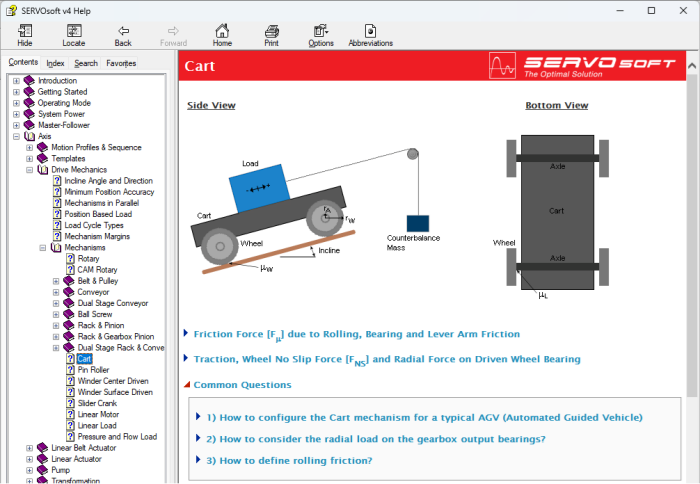
Updated Cart mechanism Help page with 'Common Questions' section
Updated Cart mechanism Help page with 'Common Questions' section including:
- How to configure the Cart mechanism for a typical AGV (Automated Guided Vehicle)
- How to consider the radial load on the gearbox output bearings?
- How to define rolling friction?
Other New Enhancements
- Main form
- Added Inertia Mismatch Utilization bar
- Asynchronous Motor (ASM) Parameters:
- Added 'Speed dependent losses' variable
- Mechanism forms
- Added Max Speed Limits to the Rotary, CAM Rotary and Belt & Pulley mechanisms
- Cart Mechanism
- Added "Wheel rolling friction" to the text on the Cart mechanism form to make it clear which friction coefficient to use for wheel rolling friction
- Power vs Time chart form
- When Shared Bus, now include the "Axis" label beside the axis mechanism combo box
- When Shared Bus, the axis mechanism combo box is now set to (none) by default so no mechanism image is displayed by default.
- Bill of Material form
- Added right-click context menu with Copy CTRL-C and Select All CTRL-A short cuts
- System Check form
- Added right-click context menu with Copy CTRL-C and Select All CTRL-A short cuts
- Added mouse cursor to change to url icon when hover over Help Topic button in message
- Previously when the Gearbox F2r, F2a, X2 & Y2 values are different than the calculated values, a Warning message was displayed. Now it is an Info message.
Database
The SERVOsoft® database continues to grow with frequent updates, and now contains over 150,000+ products! Click here for a summary of the current products in the database.
If you are a vendor and want to add your products to the SERVOsoft® database and/or are interested in the Manufacturer Promotion Version, please contact us.